Your tray.
Your workspace.
Stop hunting through File Explorer and browser bookmarks. MyTrayLinks gives you a personal command center in your Windows system tray — all your projects, links, and notes, one click away.
Your desktop is a mess.
We fixed that.
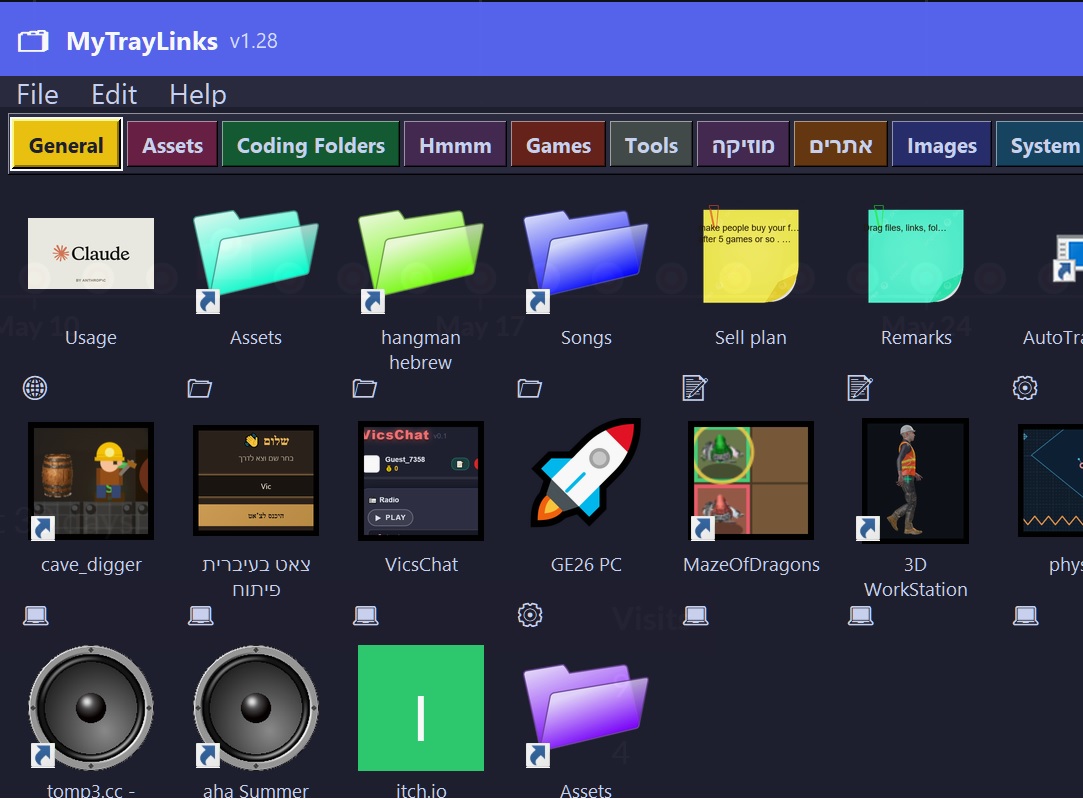
MyTrayLinks is a free Windows utility that lives in your system tray — the small icon area in the bottom-right corner of your screen. It stays completely hidden until you need it. Click the icon and a clean, fast panel opens right where you are.
Inside the panel you create tabs — one for each project, client, or area of your life. Each tab holds tiles: shortcuts to the exact files, folders, websites, and notes that belong to that project. Everything is visual, color-coded, and instantly clickable.
Think of it as a private bookmark bar that knows about your local files too. Instead of hunting through File Explorer, switching between dozens of browser tabs, or trying to remember where you saved that document — you open MyTrayLinks, click your project tab, and launch anything in one click.
When you're done, the panel closes and vanishes. No desktop clutter. No taskbar noise. MyTrayLinks waits quietly until you need it again.
Built for anyone who switches
between projects all day
Developers
Keep each repo, its docs, localhost URL, Jira board, and Figma file in one tab. Hop between projects without hunting through bookmarks and Explorer windows.
Designers & Creatives
Organize client folders, asset libraries, reference links, and brand guidelines per project. Open the right files instantly when a client calls.
Freelancers
Juggle multiple clients without chaos. One tab per client — their contracts, invoices, deliverables, and communication tools all in one place.
Power Users
Build a personal hub for every area of your life — work, side projects, hobbies, home admin. One click to get anywhere on your PC.
Up and running in 60 seconds
Install, add your stuff, and forget about disorganization forever.
Install & launch
Download the installer, run it, and MyTrayLinks appears in your system tray — no configuration required to get started.
Create tabs & tiles
Add color-coded tabs for each project. Inside each tab, drag in files, folders, web links, or quick notes as tiles.
Click from the tray
Click the tray icon to open your panel. Launch anything with one click. Close it and it disappears until you need it.
Everything in one place
All the essentials — nothing you don't need.
Files & Folders
Add any local folder or file as a tile. Open your project directory in one click instead of navigating File Explorer.
Web Links
Store dashboards, tools, and reference sites right beside the project they belong to. Open them instantly in your browser.
Sticky Notes
Attach quick reminders, tasks, or snippets to any tile. Always visible when you open that project's tab.
Color Tabs
Separate work, personal, and side projects with color-coded tabs. Switch context instantly without losing your place.
See it in action
Watch how MyTrayLinks keeps your workflow clean and fast.
Take back your desktop
Free to download. No account, no subscription, no nonsense.
Download Free